USD 20.00

Installing a multijob normally means going through your job center, your boss menu and your admin menu so each one tells the multijob what it just handed out.
Installing a multijob normally means going through your job center, your boss menu and your admin menu so each one tells the multijob what it just handed out. Miss one and jobs from that source never get saved.
JC Multijob picks the job up by itself, wherever it came from. Drop it in, and there is no other resource to touch.
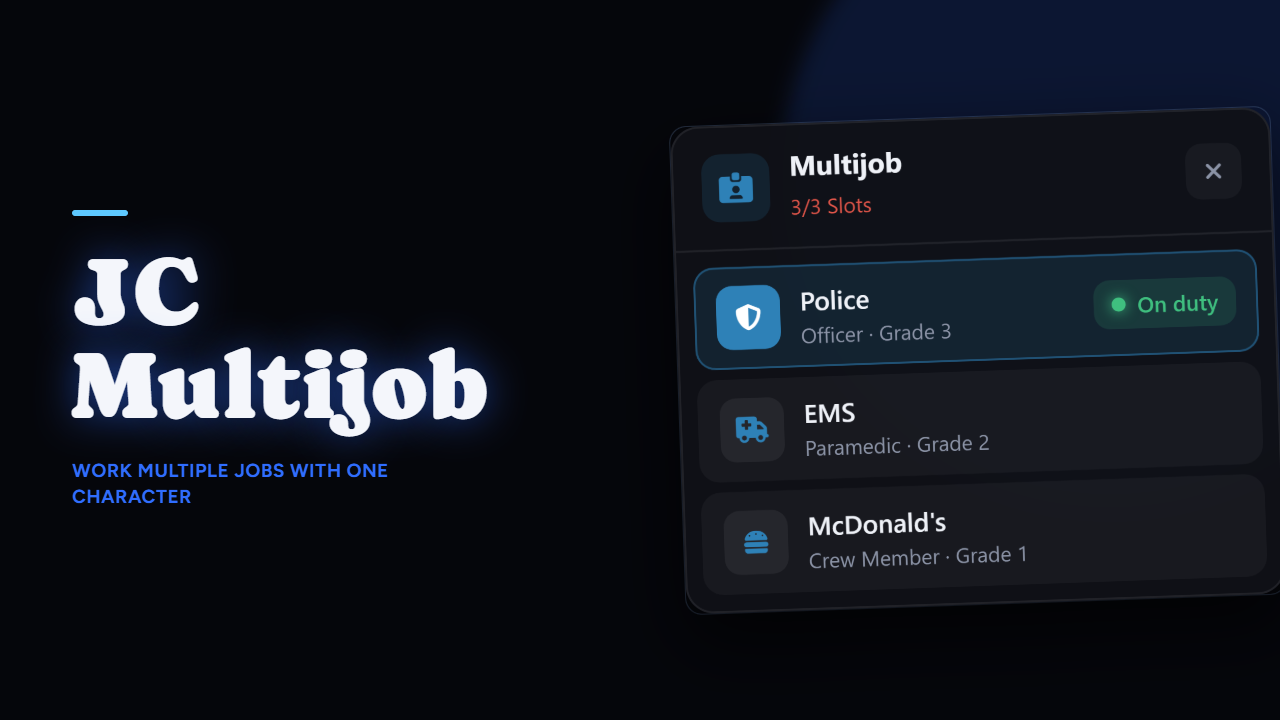
A saved job stores the rank the player actually had. Switch back to police and you're the grade you were, not reset to recruit and not handed the top one.
The active job counts as a slot, so the list always reflects what the player really has, and the last job is restored when they log back in.
The active job carries an on and off duty toggle, handled the right way for each framework: the native duty call on QBCore, the qbx_core one on QBox, and the player state plus a statebag on ESX. It's the piece that usually breaks when a server moves between them.
Switching is a server callback that only accepts a job already in that player's saved list, at the grade stored with it. A modified client sending a job name it never had gets nothing. There's a cooldown between switches, and the menu can be blocked while the player is dead or handcuffed.
ensure jc-multijob in your server.cfg, after your framework, ox_lib and oxmysqlThe SQL table installs itself on the first start. The .sql file is in the box if you'd rather run it by hand. That's the whole install.
The resource is escrow protected, with everything worth editing left open:
config/multijob.lua, the whole configuration: slots, command and keybind, blacklist and whitelist, auto-save behaviour, duty, cooldown, progressbar and the job iconslocales/, every string the script printsclient/framework/ and server/framework/, both bridges, so you can adapt it to a framework that isn't on the listServer exports to add, remove and read a player's jobs, and a client export to open the panel, so your own scripts can drive it.
Discord: https://discord.com/invite/qvHK4E6Pya
Showcase: https://youtu.be/LX35C2JQz7s
Not sure it fits your setup? Ask in the Discord before buying, I answer everything.